


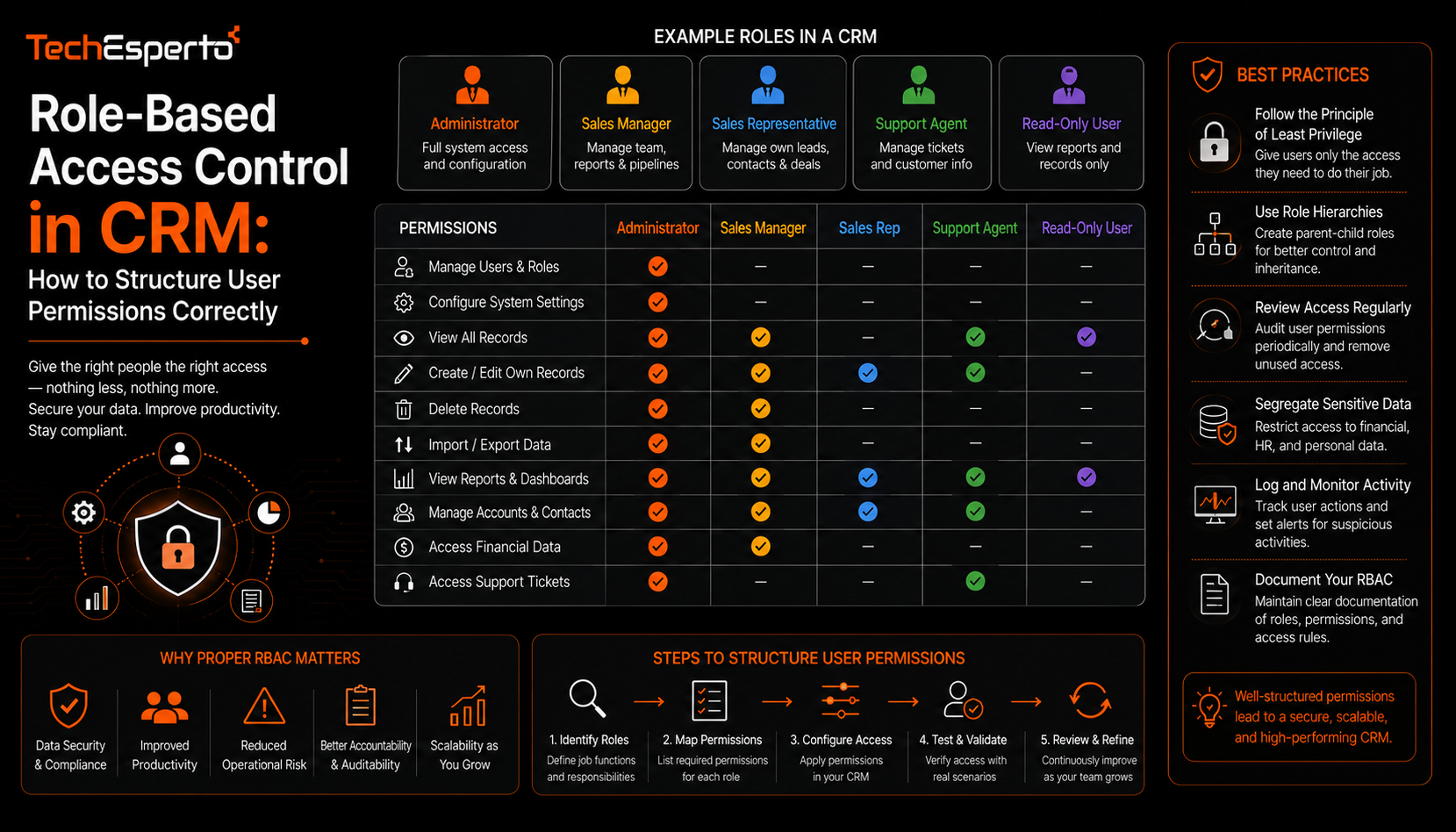
Role-Based Access Control in CRM: How to Structure User Permissions Correctly
Role-based access control in CRM determines who can see, edit, or delete what inside a system that often holds a business’s most sensitive customer data, and getting the structure wrong tends to swing between two costly extremes: locking down access so tightly that teams cannot do their jobs, or leaving permissions so open that any user can view or alter records they have no business touching. This post covers how role-based access actually works, common structuring mistakes, and how to design permissions that protect data without creating friction.
What Role-Based Access Control Actually Means
Instead of assigning permissions to each individual user one at a time, RBAC groups users into roles, such as sales rep, sales manager, or support agent, and assigns permissions to that role as a whole. Every user in that role inherits the same access level, which makes permissions far easier to manage as a team grows, since adding a new hire means assigning them to an existing role rather than configuring access from scratch.
The Core Layers of CRM Access Control
Module-Level Permissions
The broadest layer controls which modules a role can access at all, such as whether a support agent can view the Opportunities module or only Cases and Contacts. This is usually the first decision to make, since it defines the boundaries before more granular rules are applied.
Field-Level Permissions
Within a module a user can access, field-level permissions control which specific fields they can see or edit. This matters most for sensitive data, such as financial fields or health information, where a role might need general access to a record but should not see every field inside it.
Record-Level Ownership Rules
The most granular layer determines whether a user can see every record in a module or only records they own or that belong to their team. A regional sales rep, for instance, is typically restricted to records tied to their own territory rather than the entire customer base.
Common Mistakes in CRM Permission Structures
The most frequent mistake is granting overly broad access early on because it is simpler to configure, with the intention of tightening it later, a step that rarely happens once the business is already relying on the system. Another common issue is creating too many custom roles for slight variations in job function, which becomes difficult to maintain as the organization changes. And some businesses fail to review permissions after a reorganization, leaving former team members with access to modules they no longer need, or new hires without access to what their new role requires.
Designing Access Control for Regulated Industries
Businesses operating in regulated environments, including healthcare or financial services, face a stricter standard for access control, since regulators expect a documented rationale for who can see specific categories of sensitive data. In these cases, permission structures should be designed alongside compliance requirements from the outset rather than treated as a separate configuration step, since retrofitting access restrictions into a system already in daily use tends to disrupt workflows that were built around looser access.
Balancing Security with Usability
The goal of access control is not to restrict access as much as possible, but to restrict it precisely enough that legitimate work is not interrupted. Overly restrictive permissions push teams toward workarounds, such as sharing login credentials or asking an administrator to manually pull data outside the system, both of which undermine the security the permissions were meant to provide. Getting this balance right usually benefits from an experienced SuiteCRM consulting partner who has seen where overly rigid structures cause friction in practice.
Key Takeaways
Role-based access control groups permissions by role rather than by individual user, which scales far better as a team grows. Effective permission structures operate across module-level, field-level, and record-level layers, each serving a different purpose. Common mistakes include starting with overly broad access, over-creating custom roles, and failing to review permissions after organizational changes. And the goal is precise access control that protects sensitive data without pushing teams toward insecure workarounds.
Frequently Asked Questions
How many roles should a CRM typically have?
There is no fixed number, but fewer, well-defined roles are generally easier to maintain than many highly specific ones built for small variations in job function.
Does role-based access control slow down day-to-day CRM use?
Well-designed access control should not meaningfully slow down legitimate work. Friction usually comes from overly restrictive permissions rather than the concept of role-based access itself.
Should record ownership rules apply to every CRM module?
Not necessarily. Some modules may benefit from broader visibility across a team, while others, particularly those containing sensitive data, benefit from stricter ownership-based restrictions.
How often should CRM permissions be reviewed?
Permissions should be reviewed whenever there is a significant organizational change, and ideally on a regular schedule regardless, since access needs tend to drift from what was originally configured.
Is field-level permission control available in most CRM platforms?
Many modern CRM platforms, including SuiteCRM, support field-level permissions, though the depth of control varies, and some setups require additional configuration to achieve fully granular restrictions.