


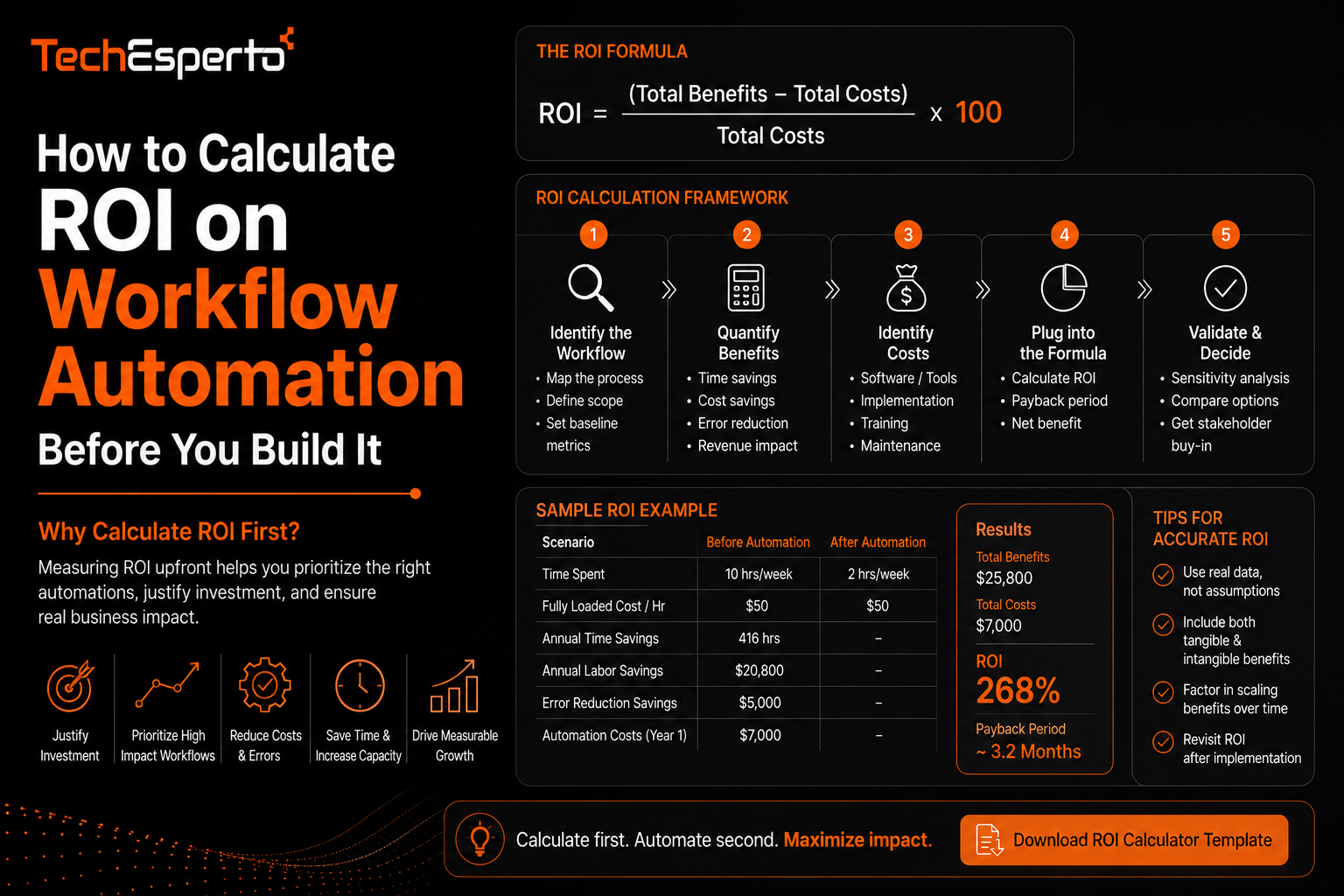
How to Calculate ROI on Workflow Automation Before You Build It
Calculating ROI on workflow automation before building anything prevents one of the most common and expensive mistakes in this space: investing in automation for a process that either was not costing the business much to begin with, or that has hidden complexity that erases the expected savings. This post walks through a practical framework for estimating returns before committing budget, including the costs that are easy to underestimate and the benefits that are harder to measure but still real.
Why ROI Should Be Calculated Before, Not After
It is common for businesses to build an automation project first and only look at whether it paid off months later, by which point the investment is already sunk regardless of the outcome. Estimating ROI beforehand, even with some uncertainty, forces a more disciplined evaluation of whether a given process is actually worth automating and helps prioritize which processes to tackle first when there are several candidates competing for the same budget.
Identifying the True Cost of the Current Manual Process
Time Spent, Not Just Headcount
The starting point is calculating how much time is actually spent on the process today, not just how many people are involved. A task taking fifteen minutes per occurrence, repeated fifty times a week, adds up to meaningful hours even if no single instance feels significant on its own. This figure, multiplied by the fully loaded cost of the people performing that work, gives a real baseline cost.
The Cost of Errors and Delays
Manual processes carry a cost beyond time, including the cost of mistakes, such as a missed follow-up or a data entry error that leads to a lost deal or a compliance issue. This is harder to quantify precisely, but even a rough estimate based on how often errors have historically occurred, and their downstream impact, should be included, since automation’s error reduction is often as valuable as its time savings.
Estimating the Cost of Building the Automation
Development and Implementation Cost
This includes the direct cost of building the automation itself, whether through native tools inside a platform like SuiteCRM or through custom development work. Costs vary significantly based on complexity, and it is worth getting a realistic estimate from whoever will build it rather than assuming a rough figure based on similar-sounding projects elsewhere.
Ongoing Maintenance Cost
Automation is not a one-time cost. Workflows need adjustment as business processes change, and integrations connected to the automation need occasional updates as the systems they connect to evolve. Underestimating this ongoing cost is one of the most common reasons projected ROI ends up overstated once real-world maintenance begins.
Calculating the Payback Period
Once you have an estimated cost of the current manual process and an estimated build and maintenance cost for the automation, the payback period is simply how long it takes for the accumulated time and error savings to exceed the total automation investment. A process costing a business the equivalent of forty hours a month, automated for a cost that pays for itself within four to six months, is generally considered a strong candidate. A process where payback stretches beyond a year deserves more scrutiny before moving forward, particularly if the process itself is likely to change before that payback period completes.
Using Tools to Structure the Estimate
Rather than building this calculation from scratch each time, a structured CRM ROI calculator can help organize the inputs, including time saved, error reduction, and implementation cost, into a consistent framework that makes it easier to compare multiple automation candidates against each other rather than evaluating each one in isolation.
Common Mistakes That Distort ROI Projections
The most frequent mistake is estimating time savings based on the best-case scenario for how the automation will perform, rather than accounting for exceptions, edge cases, and the ongoing need for human review that most automation still requires to some degree. Another common issue is ignoring the adoption curve, since even well-built automation delivers less value in its first few months while teams adjust their habits around it. And some projections leave out the cost of the process not being automated correctly the first time, since automation built on an unclear or undocumented process often needs to be revised, adding cost that was not part of the original estimate. Building out workflow automation or broader business process automation with a realistic view of these factors leads to more accurate projections and fewer surprises after launch.
Key Takeaways
ROI on workflow automation should be estimated before building, not assessed afterward, to properly prioritize which processes are worth automating. The true cost of a manual process includes both time spent and the cost of errors, not just headcount. Both build cost and ongoing maintenance cost need to be included in the automation side of the equation. And realistic projections should account for adoption curves and edge cases rather than assuming best-case performance from day one.
Frequently Asked Questions
What is a reasonable payback period for a workflow automation project?
Many businesses consider a payback period of four to six months strong, though this varies by the size of the investment and how disruptive the current manual process is to the business.
Should the cost of errors be included in ROI calculations, not just time saved?
Yes. Error-related costs, such as lost deals from missed follow-ups or compliance risks from data mistakes, are often as significant as time savings and should be factored into the total return.
How do I estimate the ongoing maintenance cost of an automation before it is built?
A reasonable approach is asking whoever builds the automation for a realistic estimate based on similar past projects, and budgeting for periodic review as business processes change over time.
Is workflow automation ROI different for small businesses versus large enterprises?
The framework is similar, but larger enterprises typically see higher absolute time savings due to volume, while smaller businesses need to weigh build costs more carefully against a smaller base of repeated tasks.
What is the biggest reason automation ROI projections turn out wrong?
Overestimating best-case time savings while underestimating ongoing maintenance and the adjustment period teams need to fully adopt the new automated process.