


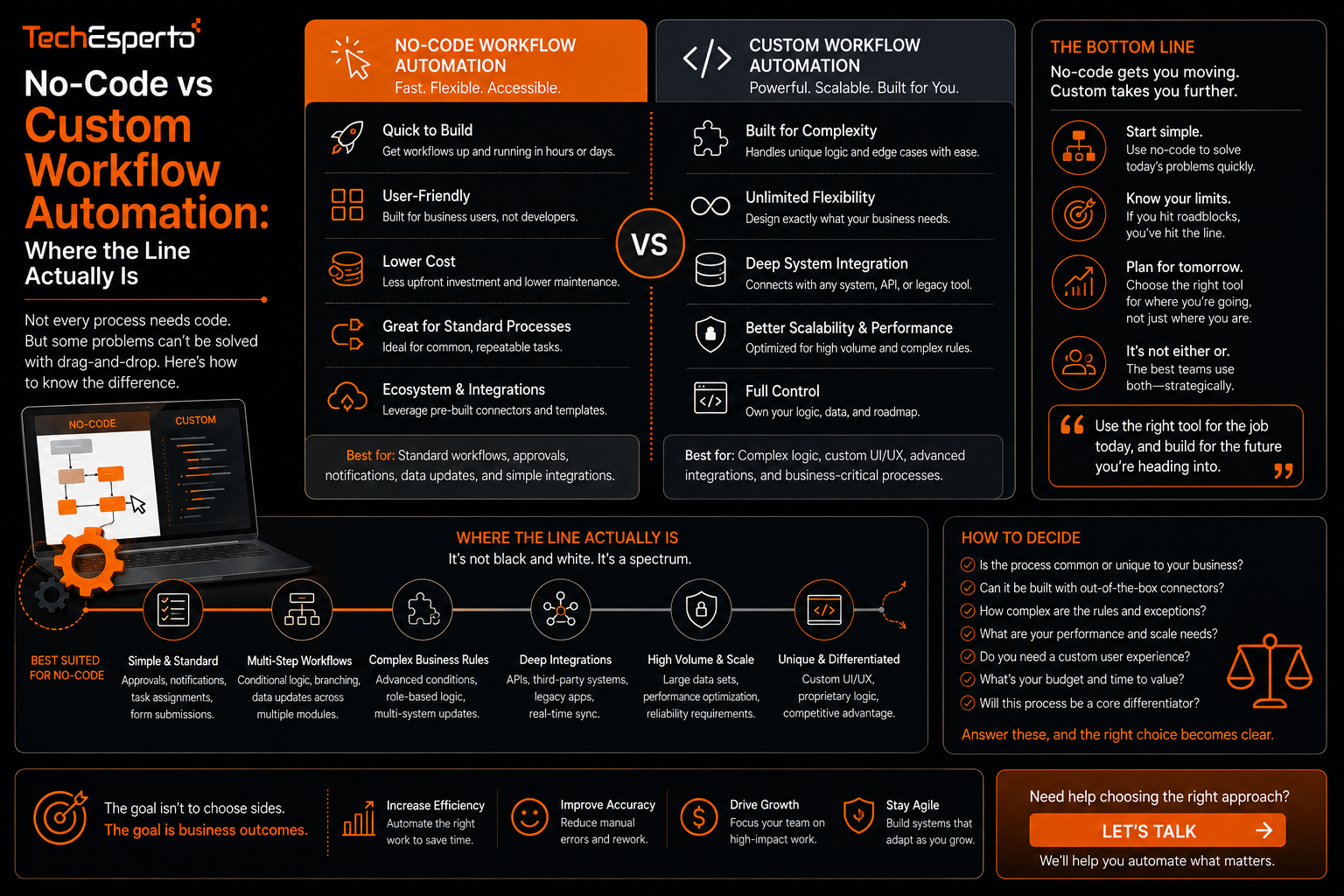
No-Code vs Custom Workflow Automation: Where the Line Actually Is
No-code vs custom workflow automation is a decision many businesses make instinctively rather than deliberately, defaulting to whichever option is easiest to reach for at the moment rather than considering which approach actually fits the complexity of what they are automating. This post lays out a practical framework for knowing when a built-in no-code workflow tool is genuinely enough, and when the underlying process is complex enough to justify custom development instead.
What No-Code Workflow Tools Are Actually Good At
A no-code workflow builder lets non-developers configure automation through a visual interface, defining trigger conditions and resulting actions without writing code. These tools handle straightforward, linear processes well, such as sending a notification when a record changes status or creating a follow-up task after a certain field is updated.
Where No-Code Tools Start to Break Down
Complex Conditional Logic
No-code tools generally handle simple conditions well, but processes involving many interdependent conditions, or logic that changes based on combinations of multiple fields, often become difficult to express clearly within a visual builder, resulting in workflows that are technically possible but hard to understand or maintain.
Cross-System Actions Beyond Native Integrations
If a workflow needs to interact with a system that is not natively supported by the no-code tool’s integration library, the automation either cannot be built at all within that tool, or requires workarounds that add fragility rather than genuinely solving the problem.
Performance at Scale
No-code workflow tools are sometimes not optimized for very high volumes of triggering events, and processes that need to run efficiently across thousands of records can hit performance or rate limits that a custom-built solution would not encounter in the same way.
What Custom Development Adds
Custom workflow automation, whether built through logic hooks or standalone scripts connected via API, removes the constraints of a visual builder entirely, allowing arbitrarily complex logic, connections to any system with an accessible API, and performance tuned specifically to the volume and speed a business actually needs. The tradeoff is that custom automation requires development expertise to build and, importantly, to maintain going forward, since changes require code updates rather than a visual reconfiguration.
A Practical Framework for Deciding
The decision generally comes down to three questions. Does the logic involve more than a handful of straightforward conditions, or does it require genuinely complex branching that would be difficult to follow in a visual builder. Does the automation need to connect to a system the no-code tool does not natively support. And does the process need to run at a volume or speed that pushes against the no-code tool’s practical limits. If the answer to any of these is clearly yes, custom development is likely the better investment despite the higher upfront cost. If the process is straightforward and the tool’s native integrations cover what is needed, a no-code approach delivers similar value with far less ongoing maintenance burden.
Starting Simple and Scaling Up
A reasonable approach for many businesses is starting with no-code workflow automation for straightforward processes, and reserving custom development specifically for the subset of automation that genuinely requires it, rather than committing to one approach across the board. This mixed strategy avoids both the trap of forcing complex logic into a tool not built for it, and the unnecessary cost of custom-building something a no-code tool could have handled just as well.
Key Takeaways
No-code workflow tools handle straightforward, linear automation well but struggle with complex conditional logic, unsupported integrations, and high-volume performance demands. Custom development removes these constraints but requires ongoing development expertise to build and maintain. The decision should be based on the actual complexity of the process being automated, not a default preference for one approach. And many businesses benefit from mixing both approaches, using no-code tools where they fit and reserving custom development for genuinely complex needs.
Frequently Asked Questions
Can a no-code workflow later be rebuilt as custom automation if it outgrows the tool?
Yes, this is a common path. A process often starts as a no-code workflow and gets rebuilt with custom development once its complexity or volume exceeds what the original tool can handle well.
Is custom workflow automation always more expensive than no-code?
Upfront, yes, since it requires development work. Over time, the cost comparison depends on how much ongoing maintenance the no-code alternative would require to keep working around its limitations.
What is the biggest sign that a workflow has outgrown a no-code tool?
Difficulty understanding or explaining the logic of the workflow itself is a strong sign, since a process that has become hard to follow visually has usually exceeded what the tool was designed to handle cleanly.
Do no-code workflow tools require any technical knowledge at all?
They generally require less technical knowledge than custom development, but understanding how triggers and conditions interact still benefits from some familiarity with how the underlying data is structured.
Should every business eventually move to custom workflow automation?
No, many processes remain well served by no-code tools indefinitely. Custom development makes sense only for the specific subset of automation that genuinely exceeds what a no-code tool can handle.