


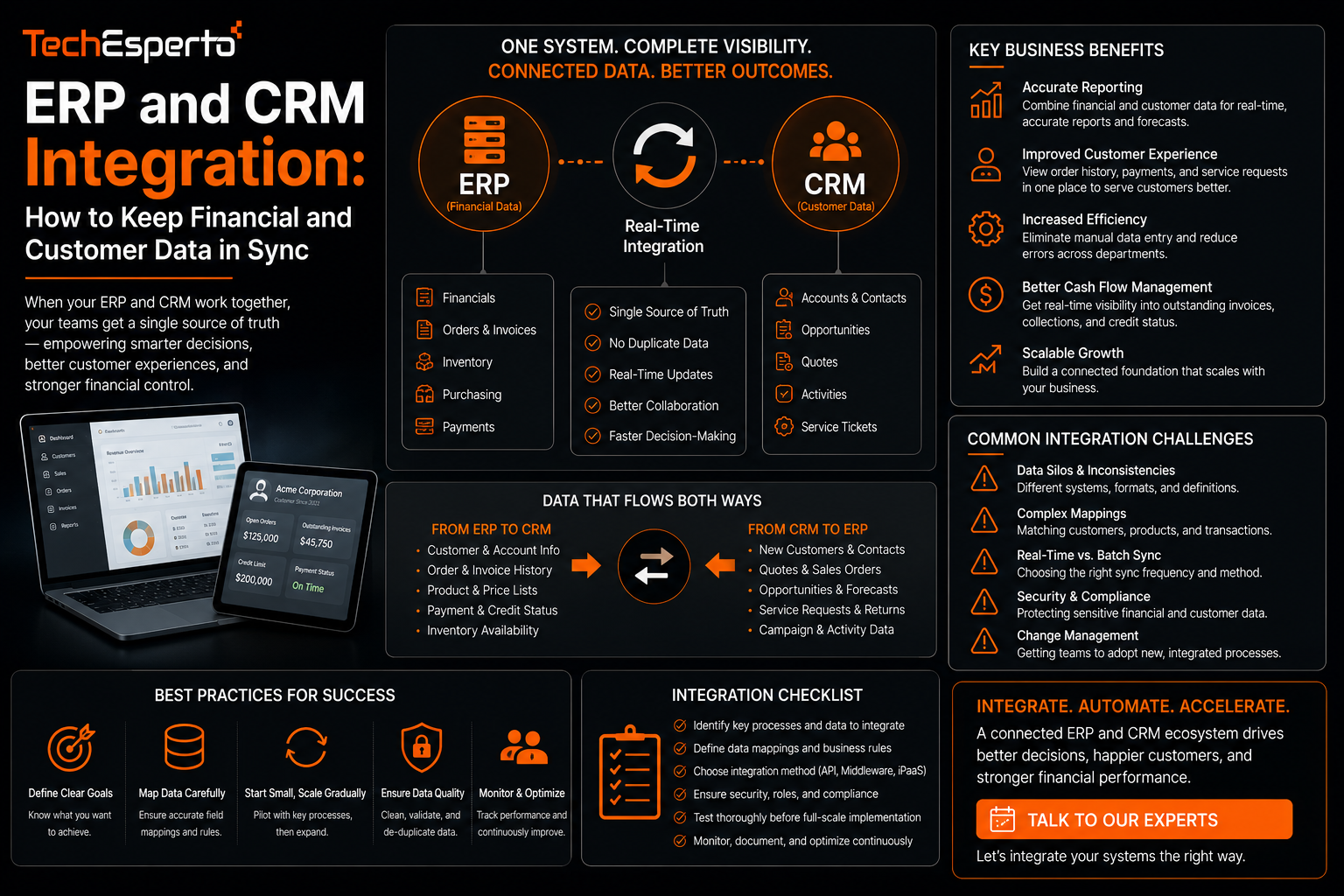
ERP and CRM Integration: How to Keep Financial and Customer Data in Sync
ERP CRM integration exists to solve a specific, recurring problem: sales and finance teams working from two different pictures of the same customer, because one team’s system does not reflect what the other has recorded. This post covers what ERP and CRM integration actually needs to accomplish, the common ways the two systems fall out of sync, and how to design an integration that keeps both teams working from the same data.
Why ERP and CRM Systems Naturally Drift Apart
An ERP system manages the financial and operational side of a business, including invoicing, inventory, and order fulfillment, while a CRM manages the customer relationship and sales pipeline. Without integration, a sales rep can close a deal in the CRM that finance never sees reflected until someone manually re-enters it into the ERP, and pricing or inventory changes made in the ERP may never reach the CRM at all, leaving sales quoting numbers that no longer match reality.
What Needs to Stay in Sync Between the Two Systems
Customer and Account Records
When a customer’s billing details, contract terms, or account status changes in the ERP, that information needs to reach the CRM so sales and support are working from current data, and the reverse is true when a CRM update, such as a new account added during a sales process, needs to create a corresponding record in the ERP.
Order and Invoice Status
Sales teams frequently need visibility into whether an invoice has been paid or an order has shipped without switching systems to check, which requires order and invoice status to flow from the ERP into the CRM in something close to real time rather than through a manual daily export.
Integration Approaches Worth Considering
Real-Time API Integration
For businesses where financial accuracy in the CRM matters immediately, a real-time integration built through direct API connections keeps both systems updated as changes happen rather than on a delay. This is generally the more robust approach for businesses with high transaction volume or where sales decisions depend on current financial data.
Scheduled Batch Syncs
For lower-volume businesses, a scheduled sync running at set intervals, such as hourly or nightly, can be a simpler and less resource-intensive approach, accepting a small delay in exchange for reduced integration complexity.
Common Mistakes in ERP-CRM Integration Projects
A frequent mistake is treating the integration as a one-time technical project rather than an ongoing responsibility, which leads to sync failures going unnoticed for weeks once nobody is actively monitoring it. Another common issue is failing to define a single source of truth for fields that exist in both systems, such as customer contact information, which leads to conflicting updates overwriting each other unpredictably. And some integrations only sync in one direction when the business actually needs bidirectional updates, leaving one system permanently behind the other.
Where This Matters Most
Manufacturing businesses in particular tend to feel the cost of disconnected ERP and CRM systems acutely, since sales quotes need to reflect real-time inventory and production capacity from the ERP to be accurate, a challenge covered in more depth in the context of manufacturing operations, where the gap between systems directly affects whether sales commitments match what operations can actually deliver.
Planning an Integration That Lasts
A durable ERP-CRM integration starts with clearly mapping which system owns which data, defining what happens when a conflict occurs, and building in monitoring that flags sync failures immediately rather than relying on someone noticing missing data weeks later. This kind of planning is typically part of a broader ERP integration engagement, where the technical connection is built alongside a clear data governance plan rather than treated as a standalone technical task.
Key Takeaways
ERP and CRM systems naturally drift apart without integration, leaving sales and finance working from different versions of the same customer relationship. Customer records and order and invoice status are the most critical data points to keep synchronized between the two systems. Real-time API integration suits high-volume businesses, while scheduled batch syncs can be sufficient for lower-volume needs. And a lasting integration requires clear data ownership rules and active monitoring, not just an initial technical connection.
Frequently Asked Questions
Should ERP-CRM integration be real-time or scheduled?
It depends on transaction volume and how time-sensitive financial accuracy is for sales decisions. High-volume businesses generally benefit from real-time integration, while lower-volume operations can work well with scheduled syncs.
What happens when the same field is updated in both systems at once?
This requires a defined conflict resolution rule, typically designating one system as the source of truth for specific fields, to prevent updates from silently overwriting each other.
Does every business need ERP and CRM integration?
Businesses where sales decisions depend on real-time financial or inventory data benefit most. Smaller businesses with simpler operations may find a lighter, manual reconciliation process sufficient depending on their scale.
How do you know if an ERP-CRM sync has failed?
Active monitoring that flags failed sync jobs immediately is essential, since a failure that goes unnoticed can leave both systems out of alignment for an extended period without any obvious warning sign.
Can ERP-CRM integration work with any CRM platform?
Most modern CRM platforms support API-based integration with common ERP systems, though the complexity and cost vary depending on how standardized the ERP’s own API and data structure are.