


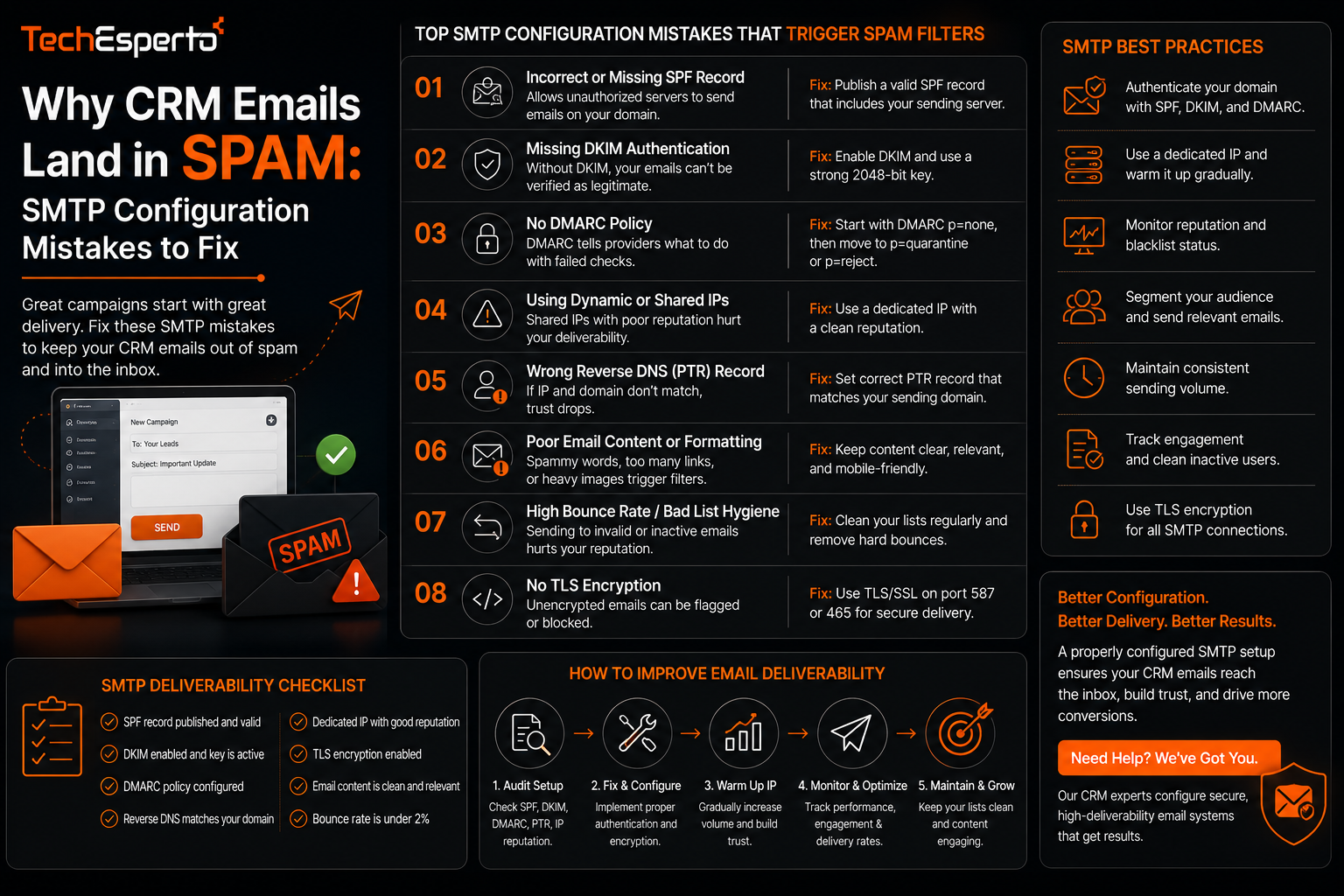
Why CRM Emails Land in Spam: SMTP Configuration Mistakes to Fix
CRM email deliverability problems are almost always traced back to a handful of SMTP configuration issues rather than anything wrong with the content of the email itself, which is why businesses often spend time rewriting subject lines and messaging when the real fix is technical. This post covers how SMTP configuration affects deliverability, the mistakes that most commonly send CRM emails to spam, and how to diagnose the issue before assuming your content is the problem.
Why Deliverability Is a Configuration Problem First
Before an email’s content is even evaluated, receiving mail servers check whether the sending domain and server are properly authenticated and configured to send mail. A perfectly written email sent through a poorly configured SMTP setup can still land in spam, because the underlying signals a receiving server checks have nothing to do with the message itself.
Missing or Misconfigured Authentication Records
SPF Records
An SPF record tells receiving mail servers which servers are authorized to send email on behalf of your domain. If your CRM’s sending server is not listed in your domain’s SPF record, or the record is misconfigured, emails can fail this check and be flagged as suspicious regardless of content.
DKIM Signing
DKIM adds a cryptographic signature to outgoing emails that lets receiving servers verify the message was not altered in transit and genuinely came from your domain. A CRM sending email without proper DKIM signing configured is missing one of the core trust signals receiving servers rely on.
DMARC Policy
DMARC builds on SPF and DKIM by telling receiving servers what to do when a message fails those checks, and it also provides reporting on authentication failures. Without a DMARC policy in place, a business often has no visibility into deliverability problems until someone notices replies have stopped coming in.
Many CRM platforms send email through shared infrastructure, meaning your deliverability can be affected by the sending behavior of other businesses using the same servers. If a shared IP has been used for spam by another sender, your legitimate emails can be caught in the resulting reputation damage even though your own sending practices were never the issue. Businesses sending high volumes of email often benefit from a dedicated sending IP specifically to avoid this shared exposure.
Content and Sending Pattern Factors
While authentication is the foundation, some content and behavior patterns still affect deliverability on top of a properly configured setup. Sudden spikes in sending volume, a high rate of bounced addresses left uncleaned in a contact list, or emails with an unusually high ratio of links to text can all contribute to spam flags even with correct SPF, DKIM, and DMARC in place. This is one of the reasons ongoing list hygiene matters as much as one-time technical setup within SuiteCRM’s marketing automation tools.
Diagnosing a Deliverability Problem
Before assuming a deliverability issue is a content problem, checking the technical fundamentals first saves significant time. Reviewing whether SPF, DKIM, and DMARC are correctly configured for the sending domain, checking bounce and complaint rates from recent campaigns, and testing actual placement using seed inboxes across major providers gives a clearer picture of where the problem actually sits before making changes to messaging. This kind of diagnostic work is typically handled as part of broader CRM automation setup, since email deliverability is directly tied to how reliably automated workflows involving email actually perform.
Key Takeaways
CRM email deliverability problems are usually rooted in SMTP authentication configuration, specifically SPF, DKIM, and DMARC, rather than the content of the email itself. Shared sending infrastructure can affect your deliverability based on other senders’ behavior, which a dedicated IP addresses for high-volume senders. List hygiene and sending pattern consistency matter alongside technical configuration, not as a replacement for it. And diagnosing deliverability issues should start with checking authentication and bounce data before assuming the problem is messaging.
Frequently Asked Questions
What is the difference between SPF, DKIM, and DMARC?
SPF authorizes which servers can send on your domain’s behalf, DKIM verifies a message was not altered and genuinely came from your domain, and DMARC defines what happens when a message fails those checks while providing reporting on failures.
Can a CRM’s email deliverability be fixed without changing the CRM platform?
Yes, in most cases deliverability issues are resolved through correcting SMTP authentication records and sending practices rather than requiring a change of platform.
Does sending volume affect email deliverability?
Yes, sudden spikes in sending volume, especially without a history of consistent sending, can trigger spam filtering even when authentication is properly configured.
Should a business use a dedicated IP for CRM email sending?
Businesses sending high email volumes generally benefit from a dedicated IP, since it removes exposure to reputation issues caused by other senders on shared infrastructure.
How can I check if my CRM emails are actually reaching the inbox?
Seed inbox testing across major email providers, combined with reviewing bounce and complaint rate data from your CRM’s sending reports, gives a reliable picture of actual placement rather than assuming based on open rates alone.