


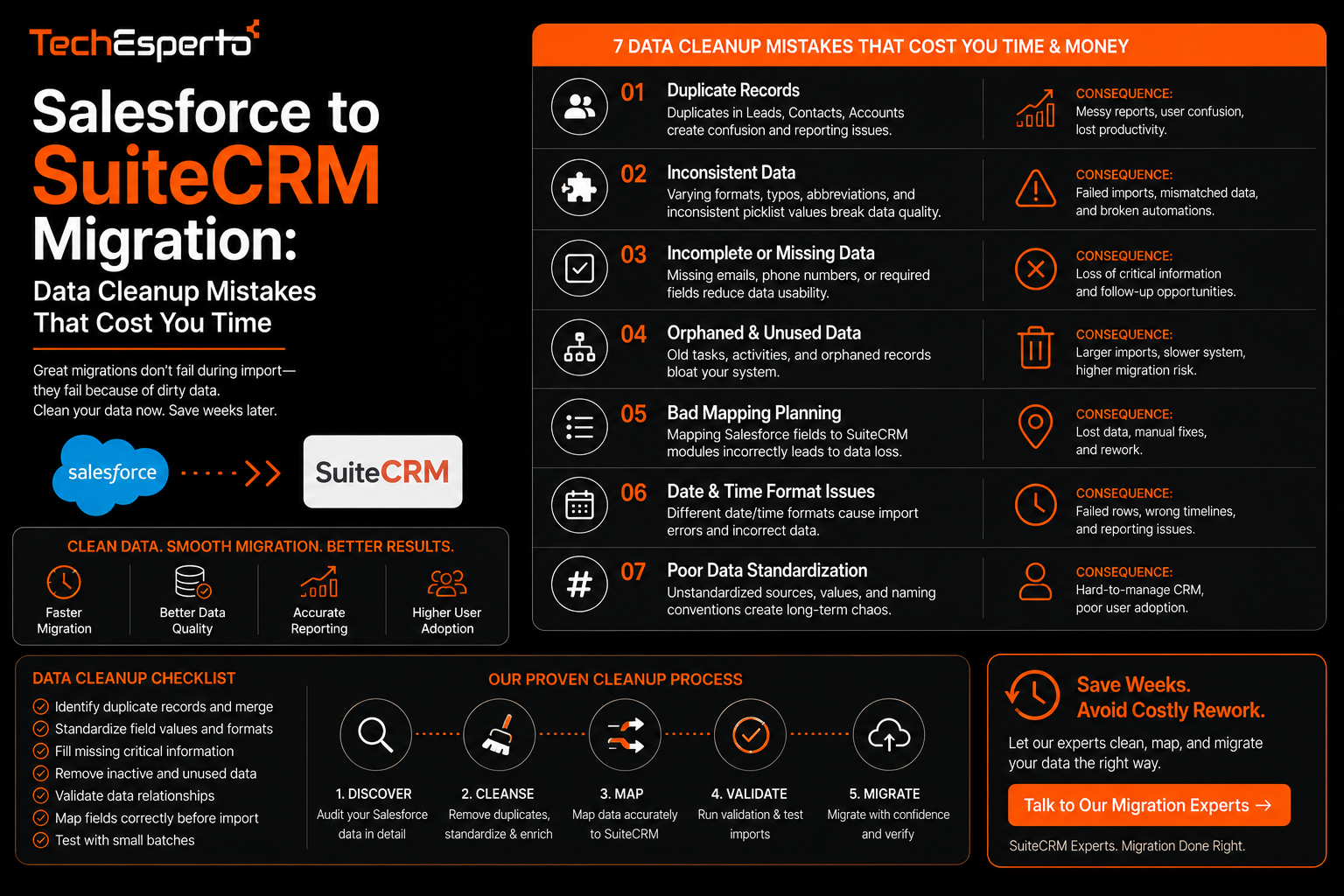
Salesforce to SuiteCRM Migration: Data Cleanup Mistakes That Cost You Time
Salesforce to SuiteCRM migration data cleanup is the part of a migration project that most often runs over budget and past deadline, not because the technical migration itself is difficult, but because the data being moved is messier than anyone realized until the process is already underway. This post focuses specifically on the data cleanup mistakes that cause the most delay, so you can catch them during planning rather than discovering them halfway through a migration.
Why Data Cleanup Is the Real Bottleneck, Not the Migration Tooling
Moving records from one system to another is a largely mechanical process once the data itself is in good shape. The actual time sink is almost always the condition of the data before migration begins, including duplicates, inconsistent formatting, and orphaned records that no longer map cleanly to anything meaningful. Underestimating this step is the single most common reason migration timelines slip.
Duplicate Records That Never Got Merged
Years of manual entry, imported lead lists, and multiple integrations feeding into Salesforce typically leave behind duplicate contact and account records that were never cleaned up. Migrating these duplicates as-is simply moves the problem into SuiteCRM rather than fixing it, and cleaning up duplicates after migration is significantly harder than doing it before, since post-migration cleanup means working across a system your team is still learning to use. Running a duplicate detection and merge pass on the Salesforce data before migration, even though it adds time upfront, consistently saves more time than it costs.
Field Mapping Errors Between the Two Platforms
Custom Fields That Do Not Translate Directly
Salesforce and SuiteCRM structure custom fields differently, and a field that worked one way in Salesforce, such as a multi-select picklist, may not have a direct equivalent in SuiteCRM without some reconfiguration. Mapping every custom field explicitly before migration, rather than relying on an automatic mapping tool to guess correctly, prevents data from landing in the wrong place or being silently dropped.
Losing Historical Context During Mapping
Some migrations focus only on current record data and overlook activity history, notes, and related records tied to a contact or opportunity. If historical context is not explicitly included in the mapping plan, it is easy to end up with clean current records in SuiteCRM that have lost the years of relationship history that made those records valuable in the first place.
Skipping Validation Before Going Live
A common mistake is migrating all data at once and only checking for problems after the new system is already in use. A better approach is running the migration against a test environment first, checking record counts, spot-checking mapped fields, and confirming that relationships between records, such as which contacts belong to which accounts, transferred correctly before cutting over the live system. This step catches issues while they are still cheap to fix, rather than after the sales team has already started working inside a system with hidden data problems. A detailed walkthrough of this validation process is covered in this SuiteCRM migration guide, which outlines the checkpoints worth confirming before a full cutover.
Underestimating Integration Dependencies
Salesforce deployments are often connected to several other systems, including marketing platforms, billing tools, and custom internal applications, each of which may need to be reconnected to SuiteCRM after migration rather than simply carrying over automatically. Mapping out every existing integration before migration begins, and confirming a plan for reconnecting or replacing each one, avoids the scramble of discovering a broken integration after the migration is already complete and the business is depending on the new system. This is typically handled as part of a structured Salesforce to SuiteCRM migration process rather than treated as an afterthought once the core data has moved.
Not Involving the Sales Team in the Data Review
Data that looks technically complete can still be functionally wrong if the people who actually use it every day were not involved in reviewing it before go-live. Sales reps often know which accounts are stale, which contacts are outdated, and which fields are used inconsistently in ways a purely technical review would miss. Involving the team in a review pass before final migration, even briefly, tends to catch judgment-based data issues that automated validation cannot.
Key Takeaways
Data cleanup, not migration tooling, is the real source of most migration delays, and duplicate records left unmerged before migration create ongoing problems in the new system. Field mapping needs explicit attention for custom fields and historical activity data, since automatic mapping tools can silently drop or misplace information. Testing the migration in a staging environment before full cutover catches problems while they are still inexpensive to fix. And mapping integration dependencies and involving the sales team in data review before go-live prevents both technical and practical surprises after the migration is complete.
Frequently Asked Questions
How long does a Salesforce to SuiteCRM migration typically take?
Timelines vary based on data volume and complexity, but data cleanup and validation, rather than the technical migration itself, are usually the largest factors affecting how long a project takes overall.
Should duplicate records be cleaned up before or after migration?
Before migration whenever possible. Cleaning duplicates after migration means working across an unfamiliar system while the business is already depending on it, which is significantly harder than resolving them in the source system first.
What happens to Salesforce activity history during migration?
Activity history and notes need to be explicitly included in the migration mapping plan. If they are not accounted for, this historical context can be lost even if current record data transfers correctly.
Can existing Salesforce integrations be automatically carried over to SuiteCRM?
No, integrations generally need to be reconnected or rebuilt individually after migration, since they were built specifically around Salesforce’s structure and do not carry over automatically.
Is a test migration necessary, or can data be moved directly into the live system?
A test migration into a staging environment is strongly recommended, since it allows validation of record counts, field mapping, and relationships before the live system is affected by any errors.