


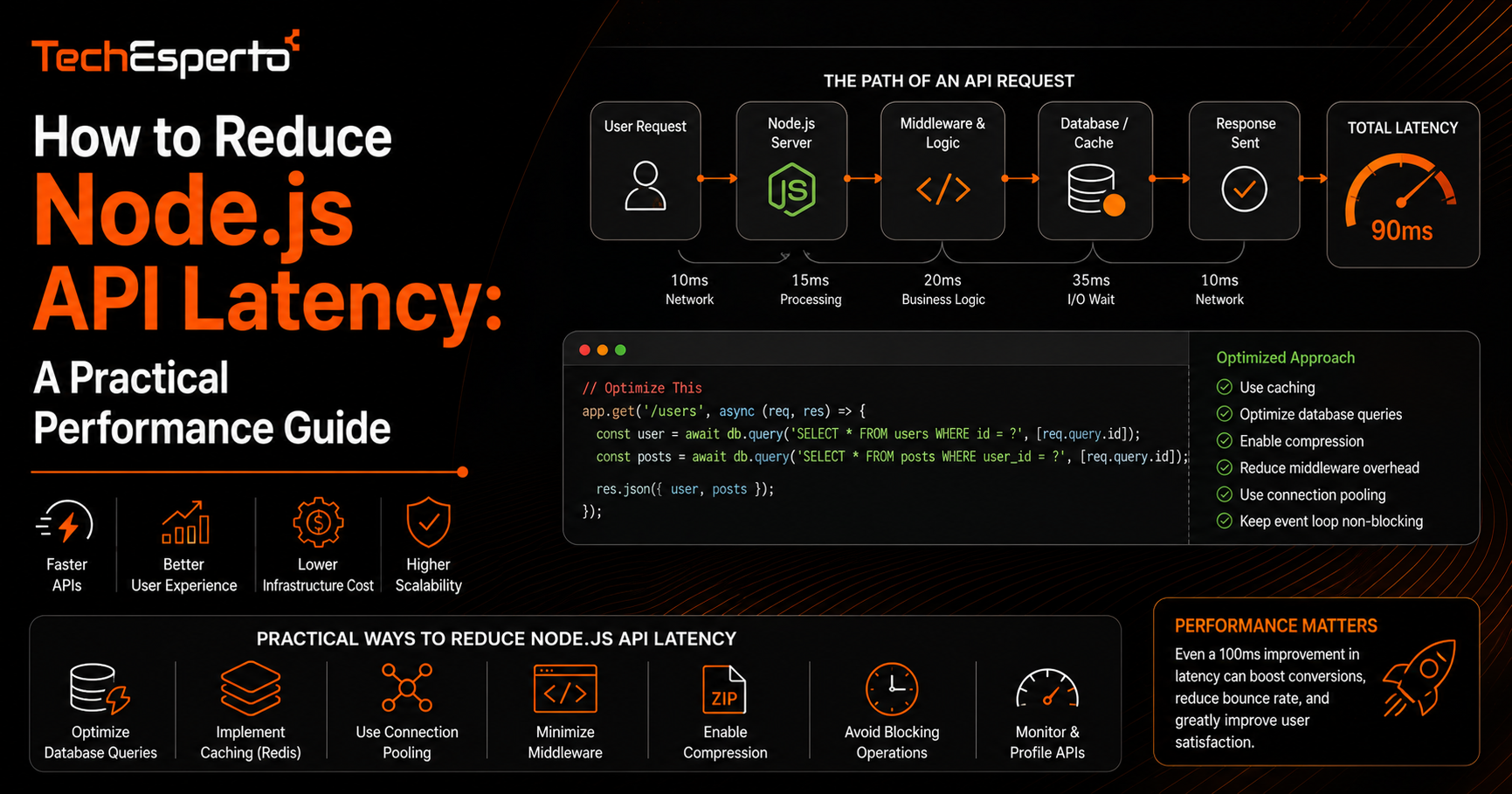
How to Reduce Node.js API Latency: A Practical Performance Guide
Reducing Node.js API latency usually comes down to a handful of recurring bottlenecks rather than some hidden framework limitation, and most teams chasing performance problems end up fixing the same few issues once they know where to look. This guide walks through the most common sources of latency in Node.js APIs, from database queries to connection handling, and the practical fixes that tend to have the biggest measurable impact.
Why Node.js Latency Problems Often Get Misdiagnosed
Node.js runs on a single-threaded event loop, which makes it efficient for handling many concurrent connections but also means a single slow or blocking operation can delay every other request waiting behind it. This leads to a common mistake: assuming Node.js itself is slow, when the actual cause is usually a specific operation blocking the event loop rather than a limitation of the runtime.
Database Query Performance
Missing Indexes and Inefficient Queries
The single most common source of API latency is a database query that has to scan more data than necessary because an index is missing or a query is structured inefficiently. Before touching application code, reviewing slow query logs and adding appropriate indexes typically produces the largest single latency improvement available.
N+1 Query Patterns
A frequent issue in APIs built around ORM libraries is the N+1 query problem, where fetching a list of records triggers a separate database query for each related item instead of one combined query. This can turn what should be a single fast request into dozens of round trips to the database, and fixing it usually involves restructuring the query to fetch related data in one batched call.
Caching Strategies
Application-Level Caching
For data that does not change on every request, caching results in memory or through a tool like Redis avoids hitting the database repeatedly for the same information. This is especially effective for data like configuration values, reference lookups, or frequently accessed but rarely changing records.
HTTP Response Caching
For endpoints returning data that is safe to serve slightly stale, setting appropriate cache headers lets clients or intermediary layers avoid making a request to your server at all for repeat calls, reducing load on the API entirely rather than just speeding up how it responds.
Connection and Resource Handling
Database Connection Pooling
Opening a new database connection for every request is expensive and adds latency that compounds under load. Configuring a properly sized connection pool, reused across requests, removes this overhead and is one of the simpler fixes with an outsized impact on latency under concurrent traffic.
Avoiding Blocking Operations
Any synchronous, CPU-intensive operation, such as heavy data processing done directly in a request handler, blocks the event loop and delays every other request being handled at that moment. Moving this kind of work to a background job queue, rather than processing it inline within the API request, keeps the event loop free to handle other traffic.
Infrastructure and Deployment Choices
Latency is not only a code problem. Where an API is hosted relative to its users and its database matters significantly, since network round-trip time adds up quickly across multiple calls. Running the API and database in the same region, and using a content delivery network for anything that can be cached at the edge, are infrastructure-level decisions that often matter as much as code-level optimization. This is typically where broader cloud consulting work becomes relevant, since infrastructure architecture decisions made early in a project are harder to change later without downtime.
Monitoring and Ongoing Performance Management
Latency problems tend to reappear as an application grows, even after an initial round of fixes, since new features add new queries and new dependencies that were not part of the original performance review. Setting up ongoing monitoring that flags slow endpoints and database queries as they emerge, rather than waiting for user complaints, keeps performance issues from accumulating unnoticed. This kind of continuous oversight is often part of a broader DevOps practice, where performance monitoring is built into the deployment pipeline rather than treated as a separate, occasional exercise.
Key Takeaways
Most Node.js API latency issues trace back to database queries, particularly missing indexes and N+1 query patterns, rather than the runtime itself. Caching, both at the application level and through HTTP headers, reduces repeated load on the database and the API. Connection pooling and avoiding blocking operations in request handlers prevent the event loop from becoming a bottleneck under concurrent traffic. And infrastructure decisions, including hosting region and ongoing monitoring, matter as much as code-level fixes for sustained performance.
Frequently Asked Questions
Is Node.js inherently slower than other backend runtimes?
No. Node.js handles concurrent I/O efficiently, but its single-threaded event loop means blocking operations affect all requests at once, which is often mistaken for a general performance limitation rather than a specific coding issue.
What is the fastest way to identify a Node.js latency problem?
Reviewing database slow query logs is usually the quickest way to find the largest source of latency, since inefficient queries are the most common bottleneck in real-world APIs.
Does adding more servers fix Node.js latency issues?
Adding servers can help with throughput under high traffic, but it does not fix an underlying inefficient query or blocking operation, which will still slow down each individual request regardless of how many servers are running.
How much does database connection pooling actually help?
It can meaningfully reduce latency under concurrent load, since opening a new connection per request adds overhead that compounds as traffic increases, while a properly sized pool reuses existing connections.
Should caching be handled at the application level or the infrastructure level?
Both have a role. Application-level caching reduces database load for frequently accessed data, while infrastructure-level caching, such as a content delivery network, reduces load on the API server itself for cacheable content.