


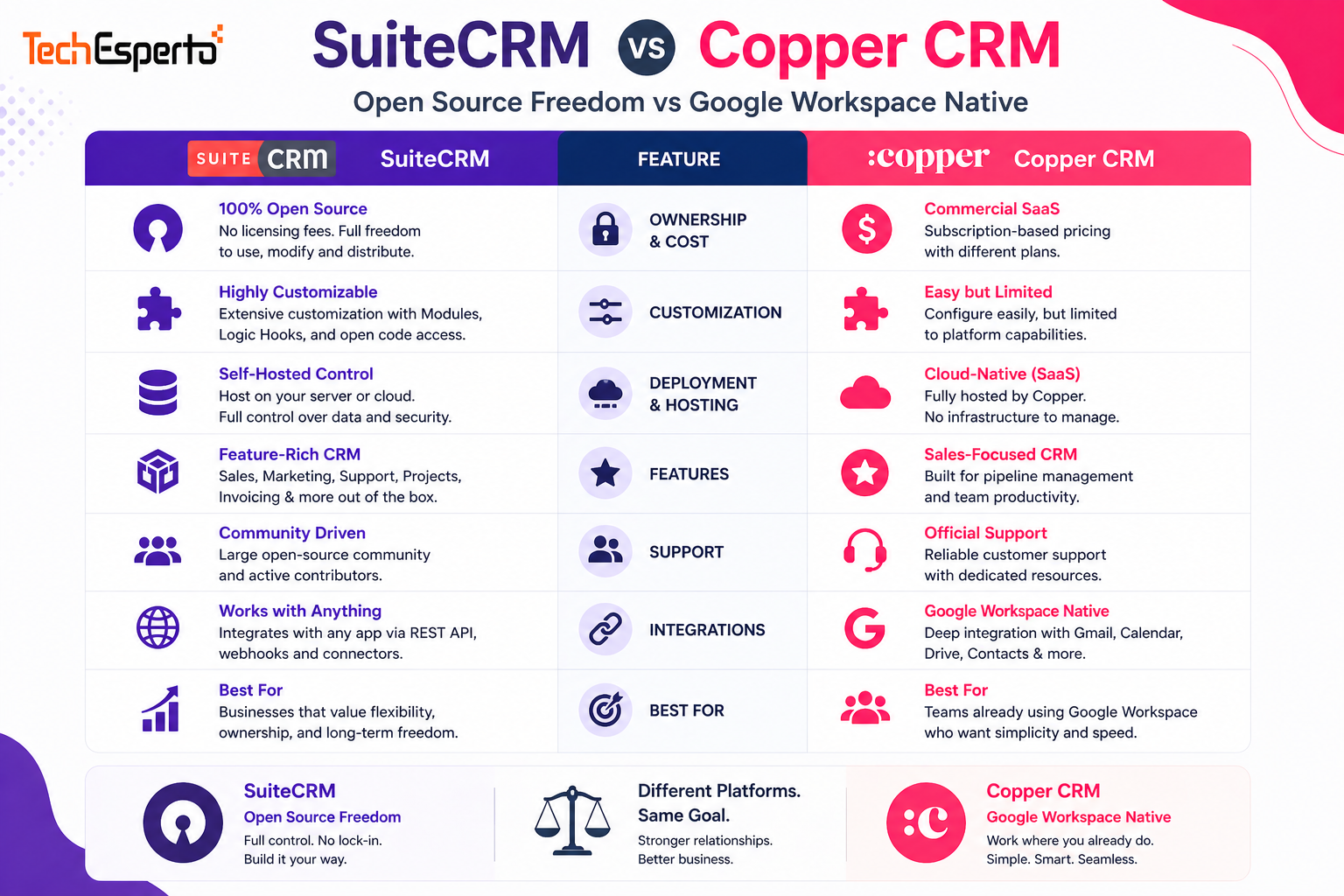
SuiteCRM vs Copper CRM: Open Source Freedom vs Google Workspace Native
Copper CRM has carved out a unique niche: it’s the only CRM officially recommended by Google for Workspace users. It lives inside Gmail, auto-logs emails, syncs with Google Calendar, and feels like a natural extension of your inbox rather than a separate application. For Google-native teams, that seamlessness is genuinely compelling.
But Copper is Google-only (it won’t work with Outlook or any other email provider), locks real sales features behind its $59/user Professional plan, and limits contacts per tier. SuiteCRM offers the opposite trade-offs: works with any email provider, includes every feature for free, handles unlimited contacts, and provides deep customization that Copper can’t match — but requires more setup effort.
Pricing: Where Copper Gets Expensive Fast
Copper CRM Pricing
Copper offers four tiers, but the entry-level plans are misleading:
Starter ($9/user/month): 1,000 contact limit. No Sales Opportunities. No Leads module. Basically a contact manager, not a CRM.
Basic ($23/user/month): 2,500 contacts. Still no Sales Opportunities or Leads. Task management and project tracking only.
Professional ($59/user/month): This is where Copper becomes a real sales CRM — Leads, Opportunities, pipeline management, workflow automation, bulk email, and AI tools. 15,000 contacts.
Business ($99/user/month): Unlimited contacts, advanced reporting, email sequences, custom reports, and multiple pipelines.
The critical detail: Copper’s Starter and Basic plans don’t include Sales Opportunities or Leads — the core features of any sales CRM. Most teams need Professional at minimum, making Copper’s real entry price $59/user/month, not the $9 headline.
A 10-user team on Professional: $59 × 10 = $590/month = $7,080/year. A 20-user team on Business: $99 × 20 = $23,760/year.
SuiteCRM Pricing
$0 licensing. Unlimited users, unlimited contacts, all modules. Sales pipeline, marketing campaigns, customer support, workflows, reports, custom modules — everything included. Hosting: $50–$200/month. Implementation: $5,000–$15,000 one-time.
A 10-user team saves $5,000+/year vs Copper Professional. Over 3 years with 20 users on Copper Business: SuiteCRM saves $65,000+. See our cost analysis.
Feature Comparison
| Feature | SuiteCRM | Copper Professional |
| Licensing | $0 (unlimited everything) | $59/user/month |
| Contact Limit | Unlimited | 15,000 (Business = unlimited) |
| Email Providers | Any (Gmail, Outlook, custom) | Google Workspace only |
| Sales Pipeline | Unlimited, fully customizable | Visual pipeline |
| Marketing Campaigns | Built-in (email, target lists, web-to-lead) | Not included |
| Customer Support | Cases, Knowledge Base, Portal | Not included |
| Workflow Automation | Unlimited, free | Professional+ only |
| Custom Modules | Unlimited via Module Builder | Custom fields only |
| Quotes & Invoices | Built-in with PDF templates | Not included |
| Reporting | Full custom reports (free) | Basic (advanced = Business tier) |
| API | Open REST API | REST API |
| Source Code | Full access (open source) | None |
| Data Hosting | Self-hosted (your servers) | Copper cloud only |
| Security Groups | Granular team-based RBAC | Basic role permissions |
| Gmail Integration | Via IMAP/OAuth + plugins | Native (deepest available) |
| Google Calendar Sync | Built-in sync | Native (auto-sync) |
| Mobile | SuiteCRM Mobile App | Native iOS/Android |
Where Copper Wins
Deepest Google Workspace integration available. No CRM embeds into Gmail more deeply than Copper. The Chrome Extension sidebar shows full contact records while reading any email. Every email, meeting, and file is auto-logged without user action. Contact suggestions appear based on email frequency. For teams that live in Gmail 8 hours a day, this zero-friction integration is transformative for adoption.
Automatic data capture. Copper reduces manual data entry better than almost any CRM. Emails auto-log. Calendar meetings auto-appear in contact timelines. New contacts are auto-suggested from email interactions. For teams where the #1 CRM adoption blocker is “I don’t want to enter data,” Copper removes that objection.
Fastest setup for Google teams. Sign up with your Google account, authorize Workspace access, install the Chrome Extension, and you have a partially populated CRM within hours — Copper pulls contacts and history from your Gmail automatically. SuiteCRM takes weeks for a comparable deployment.
Clean, modern UI. Copper scores 9.0/10 on G2 for ease of use. The Google Material Design interface feels familiar to anyone who uses Gmail daily. Minimal learning curve.
Built-in project management. Copper added project tracking in 2025 — managing client delivery alongside sales in one tool. Useful for agencies, consultancies, and professional services that need CRM + project management without separate software.
Where SuiteCRM Wins
Works with any email provider. Copper requires Google Workspace — period. If your team uses Outlook, Microsoft 365, or any non-Google email, Copper is not an option. SuiteCRM integrates with Gmail, Outlook, Yahoo, or any SMTP/IMAP provider. You’re never locked into one email ecosystem.
Complete CRM — not just sales. Copper is a sales and relationship management tool. It lacks built-in marketing campaigns (email, target lists, web-to-lead), customer support (Cases, Knowledge Base, Customer Portal), quotes and invoices with PDF generation, and products catalog with pricing management. SuiteCRM includes all of these for free. Copper users needing marketing or support buy additional tools — adding cost and data silos.
Unlimited contacts on every plan. Copper caps contacts: 1,000 on Starter, 2,500 on Basic, 15,000 on Professional. Exceeding limits forces an upgrade. SuiteCRM handles 500,000+ contacts at zero additional cost. For businesses with large databases — retail, e-commerce, or any high-volume operation — SuiteCRM eliminates contact-based pricing anxiety.
Unlimited customization depth. Copper lets you customize fields and pipelines within its framework. SuiteCRM lets you build entirely new custom modules, write Logic Hooks for code-level automation, create industry-specific workflows (healthcare, manufacturing, insurance), and modify any aspect of the platform. The difference is configuration vs creation.
Complete data ownership. SuiteCRM self-hosted means your data stays on your infrastructure — any cloud provider, any country, any security configuration. Copper is cloud-only on their servers. For businesses in regulated industries needing data sovereignty, GDPR compliance, or HIPAA compliance, SuiteCRM provides control Copper can’t.
No per-user cost scaling. Every new hire on Copper costs $59–$99/month. Every new user on SuiteCRM costs $0. For growing teams, seasonal businesses, or organizations with many CRM users (sales + support + marketing + management), SuiteCRM’s flat-cost model provides predictable budgeting.
Stronger reporting. SuiteCRM’s reporting engine creates fully custom reports across any module with grouping, filtering, conditions, charts, and scheduling — all free. Copper’s advanced reporting requires the Business tier ($99/user) and still lacks the cross-module depth SuiteCRM provides.
Who Should Choose What
Choose Copper if:
- Your entire team is 100% on Google Workspace and won’t switch
- Automatic Gmail data capture is your #1 adoption priority
- Your team is under 10 users with straightforward sales pipeline needs
- You don’t need marketing campaigns, customer support, or custom modules
- Fast setup (hours, not weeks) matters more than long-term flexibility
- Project management alongside CRM is valuable for your workflow
Choose SuiteCRM if:
- Your team uses Outlook, Microsoft 365, or mixed email providers
- You need complete CRM — sales, marketing, support, and custom modules
- You have 10+ users and long-term cost savings matter ($5,000+/year)
- Industry-specific customization is required
- Data ownership and self-hosting are non-negotiable
- You need unlimited contacts without tier-based caps
- You have PHP developers or a SuiteCRM partner
SuiteCRM + Google Workspace: Best of Both Worlds
You don’t have to choose between SuiteCRM and Google integration. SuiteCRM integrates with Google Workspace — Gmail via IMAP/OAuth, Google Calendar sync (built-in since v7.11), Google Contacts sync via plugins, and Google Drive document linking. It’s not as seamlessly embedded as Copper’s Chrome Extension, but it provides functional Google integration alongside the full CRM capabilities Copper lacks.
Migration from Copper to SuiteCRM
If you’re outgrowing Copper’s limitations — contact caps, missing modules, or cost at scale — TechEsperto handles CRM migration from Copper to SuiteCRM. Copper allows data export. We map contacts, companies, opportunities, activities, and custom fields with full relationship preservation. Most migrations complete in 2–4 weeks.
As the Official SuiteCRM Professional Partner, TechEsperto provides objective CRM assessments. Contact us for a free comparison consultation.
FAQs
Q1: Does Copper CRM work with Outlook? No. Copper requires Google Workspace — it does not work with Outlook, Microsoft 365, or any non-Google email provider. SuiteCRM works with any email provider.
Q2: Why is Copper’s real price $59/user, not $9? Copper’s Starter ($9) and Basic ($23) plans don’t include Sales Opportunities or Leads — the core sales CRM features. Most sales teams need Professional ($59/user) as the realistic starting point.
Q3: Can SuiteCRM integrate with Gmail? Yes. SuiteCRM integrates with Gmail via IMAP/OAuth for email, built-in Google Calendar sync, and plugins for Google Contacts and Drive. It’s not as deeply embedded as Copper’s Chrome Extension but provides full functional integration.
Q4: Which is cheaper for 15 users? SuiteCRM: ~$200/month (hosting). Copper Professional: $885/month. Annual savings with SuiteCRM: ~$8,220.
Q5: Does Copper have marketing automation? No. Copper focuses on sales and relationship management. Marketing campaigns, email automation, and lead nurturing require additional tools. SuiteCRM includes a full Campaigns module for free.
Q6: Can I self-host Copper? No. Copper is cloud-only. SuiteCRM can be self-hosted on any infrastructure for complete data control.
Q7: Which has better reporting? SuiteCRM. Full custom reports across all modules — free. Copper’s advanced reporting requires the Business tier ($99/user) and is more limited in cross-module capabilities.
Q8: Can TechEsperto migrate us from Copper? Yes. We handle complete migrations from Copper including contacts, companies, deals, activities, and custom fields. Contact us for a free assessment.